
Keywords: Eden Hazan, iPhone transition tutorial, mobile videography, Instagram Reels tips, camera tricks, product video, transition reels
View the original post on Instagram →
Comments Overview
- 30,598 likes on the original post
- 355 comments on the original post
- 100 comment(s) sampled for this analysis
- Dominant sentiment: Positive
The comments are mostly enthusiastic, with users praising the transition, calling it easy or smooth, and saying they plan to try it. Several viewers also asked how the phone is positioned and how the clips are edited, while one comment criticized the result.
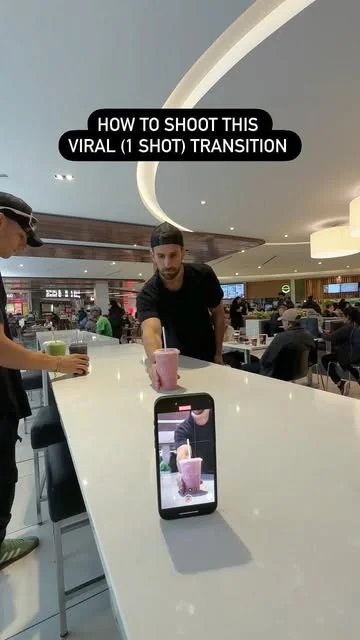
Eden Hazan, the verified creator behind pov.eden, shared a Reel showing an easy one-shot transition tutorial filmed for restaurant client @culturesresto. The tutorial uses four similar objects, an iPhone and a helper to create a smooth product-change effect.
Published on April 25, 2024, the Reel has received 30,598 likes, 355 comments and 1,865,538 plays. Hazan says it was filmed in about 37 seconds in the middle of a busy food court, using only an iPhone.
The full caption
Easy 1-shot Transition Tutorial 🤓🎬 | Tips below👇🏻
—
Here’s an easy 1-shot transition we shot last week for my client @culturesresto in approximately 37 seconds, in the middle of a busy food court.. using only an iPhone!!!!
You’ll need 4 similar objects for this one as well as an additional person (shoutout to @donsamhazan ) to lend a hand.
Set up: Position your phone on the table (yes you can use a tripod as well) and switch your video camera setting to either 2 or 3x… then hit record.
The shot: Push each of the 4 items toward the camera in the exact same way (try to follow the same line).
BONUS: Have your helper replace each one of the objects so that you can freeze and maintain the same position between each product change
Was this helpful? Join the conversation below!!!!
.
.
.#mobilevideography #cameratricks #transitionreels #transition
pov.eden
How Eden Hazan’s transition works
- Prepare the setup. Place the phone on a table, or use a tripod. Hazan recommends switching the camera setting to either 2x or 3x.
- Choose four similar objects. These become the products or items shown in the transition.
- Keep the movement consistent. Push each object toward the camera in the same way and try to follow the same line each time.
- Use a helper. Hazan credits @donsamhazan with helping replace each object while the phone maintains its position.
- Join the changes in the edit. The identical positioning between product swaps helps create the smooth transition shown in the Reel.
What the post shows
The Reel focuses on mobile videography and camera tricks for food and product content. Its four hashtags are #mobilevideography, #cameratricks, #transitionreels and #transition. The post also tags @culturesresto and @donsamhazan.
Hazan’s instructions are designed for a quick shoot: keep the camera fixed, repeat the same forward motion and have the helper handle the swaps. The post does not require a dedicated camera, according to the caption.
What people are saying
The response is largely positive. Many commenters used fire, heart and clapping emojis, while others said the idea looked easy, smooth or useful. Some food and drink businesses also said they wanted to adapt it for their own products.
“Gotta do this with the JUICE 🤩 thanks bro!!”
freshouse.juicebar
“Brilliant and easy 👏🏼”
creativefig_
“Just used this on a sponsor promo reel!! THANK YOU!!!!! 🙌 sent it to you also 🤝🏽”
abcerda
Viewers also wanted more editing details. Questions included how the phone stays upright, how the transition is assembled and how the helper’s hand stays out of the final video. One commenter asked, “How is the phone standing on its own ?” while another wrote, “How do you cut it and join it?”
“That looks like garbage 👍”
thingsfromsteinfarm
That criticism is an outlier among the supplied comments, which otherwise lean toward encouragement, curiosity and plans to try the technique.
With a simple setup and a clear sequence, Eden Hazan’s Reel turns a product shoot into a practical iPhone transition lesson. The strong play count and active comment section show that the quick tutorial connected with viewers interested in making food and product videos.